Approval Policy
Supported only in FCP-Suite or FCP-SE.
See Data approval configuration. This feature is disabled by default.
To meet data security requirements, the platform provides controlled outbound data download (data egress) with an approval workflow.
Permissions: For details, see Permissions.
Prerequisite: Grant download permissions to users.
Configure the approval policy
Approval flow settings
The approval flow is enabled by default. You can configure approval steps and approvers. Go to System Management > Approval Policy. Click Set approvers to add platform users as approvers. The default approver is the admin super administrator. For non-admin users to download files, the approval flow must be approved. If approval is disabled, downloads no longer require approval and users with download permission can download directly.
Field descriptions
- Enable download approval: Enabled by default. When enabled, all downloads require approval.
- Approval whitelist: When approval is enabled, users/groups in the whitelist can download directly without approval.
- Approval flow: Two levels by default, with
adminas approver for each level. Up to 10 levels are supported.
Roles and scope
adminsuper administrator: Onlyadmincan operate on all approval data.- Approver: Both admins and regular users can be set as approvers. Only approvers receive approval email notifications.
- Whitelisted user: When approval is enabled, whitelisted users can download without approval.
- Regular user: Downloads require approval. Outbound data downloads must be approved before download.
Approval data retention
Approval data is retained for 7 days by default and can be customized. Deletion rules:
- Rejected approvals: Automatically deleted 7 days after the rejection time.
- Approved approvals: Automatically deleted 7 days after data is moved to the download directory.
Preconditions for changing approval policy
- You can modify the approval policy only when there is no data currently in approval.
- If there is data in approval, you cannot disable approval, change the approval flow, or change approvers.
Approval flow rules
- At least one approval level must remain. Up to 10 levels are supported.
- You can delete any approval level from level 2 to level 10. The system updates ordering automatically.
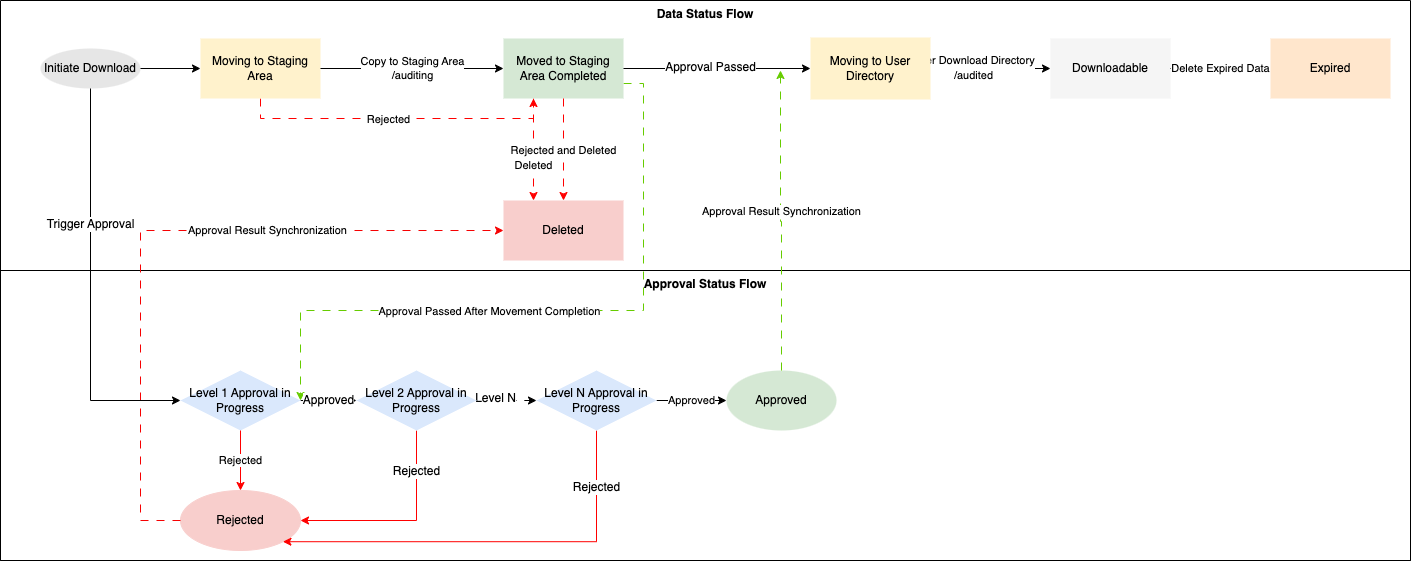
- Approval levels are processed sequentially. After a level is approved, it proceeds to the next level. If any approver approves or rejects, the flow proceeds to the next step.
- End conditions: If all levels approve, status becomes Approved and the flow ends. If any level rejects, status becomes Rejected and the flow ends.
- Each approval level can have up to 10 users.
Approval whitelist
Whitelisted users are not subject to approval. When the approval policy is enabled, whitelisted users can download data directly without going through the approval flow.
- Effective condition: Only effective when approval is enabled. Whitelisted users can download directly.
- Whitelist can be configured for users or groups.
Flow charts
Approval flow chart
Data status flow and approval status flow.
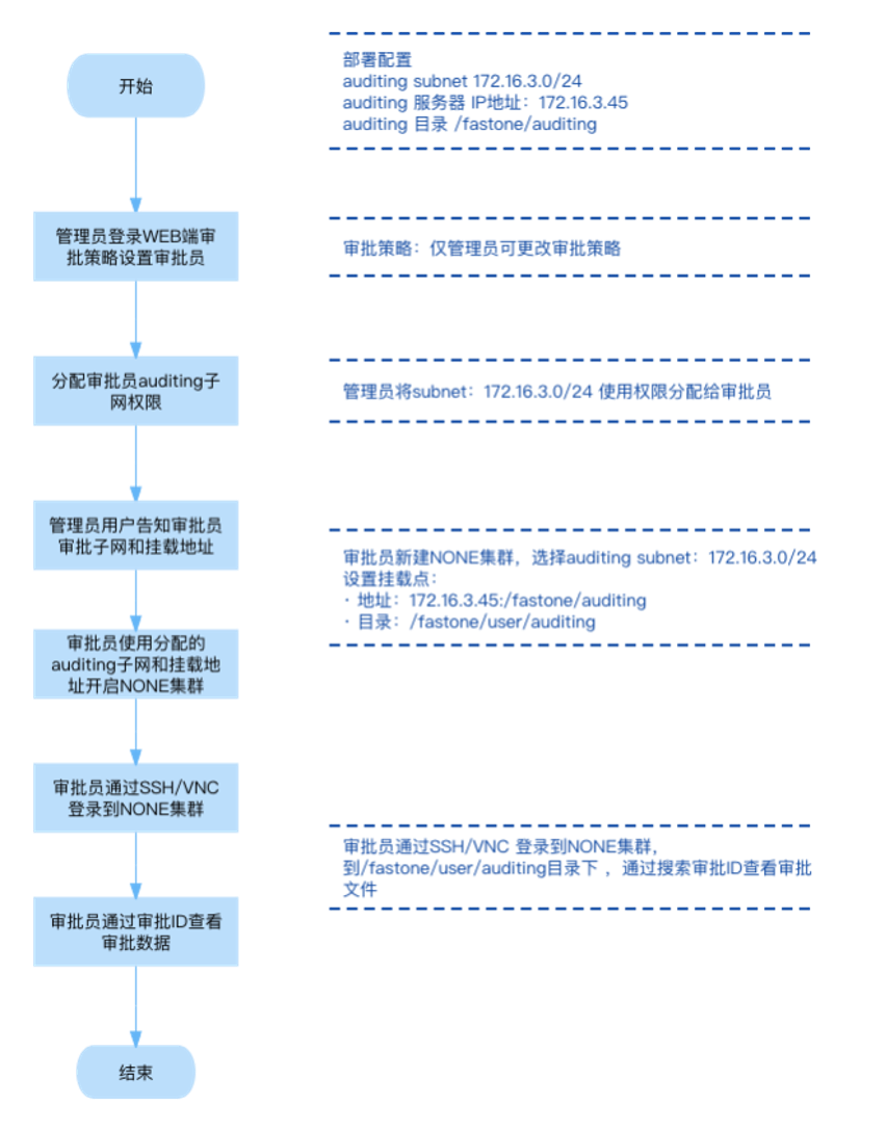
Approval data viewing flow chart
Grant approvers permission to use the approval subnet, then create an approval cluster to view approval data. For configuration, see Request Management: Create and use an approval cluster.
Approval data viewing flow: