Introduction to Fsched
What is Fsched?
Fsched is Fastone's in-house HPC cluster resource management and job scheduling software, referred to as the scheduler. Fsched is pronounced /'ef,sked/.
Fsched can distribute computing workloads across heterogeneous, elastically scalable computing clusters, helping users complete computing jobs more efficiently on a shared computing cluster, while also helping enterprises improve resource utilization and reduce the business impact caused by single points of failure.
In high-performance computing (HPC) environments, an HPC scheduler is a key component responsible for managing and allocating computing resources, such as compute nodes, processor cores, and memory, to jobs waiting to run. The main functions of a scheduler include resource management, job scheduling, monitoring and reporting, and scheduling policy configuration.
The Fsched scheduler has complete independent intellectual property rights and has been deployed in production environments across multiple industries, scales, and applications for many years. Its performance, ease of use, and stability have been validated in practice and have received extensive positive feedback.
Fsched Editions
Fsched is available in two editions:
- Fsched SE (Standard Edition): Unless otherwise specified, "Fsched" in this documentation refers to the standard edition of Fsched. Fsched is not released as a standalone product, but is built into other Fastone products, such as FCP and FCC-E.
- Fsched CE (Community Edition): Fsched CE is free for users and can be used freely on clusters with up to 6 nodes or 300 CPU cores. Fsched CE is supported through the community only and does not include commercial support.
Cluster Architecture
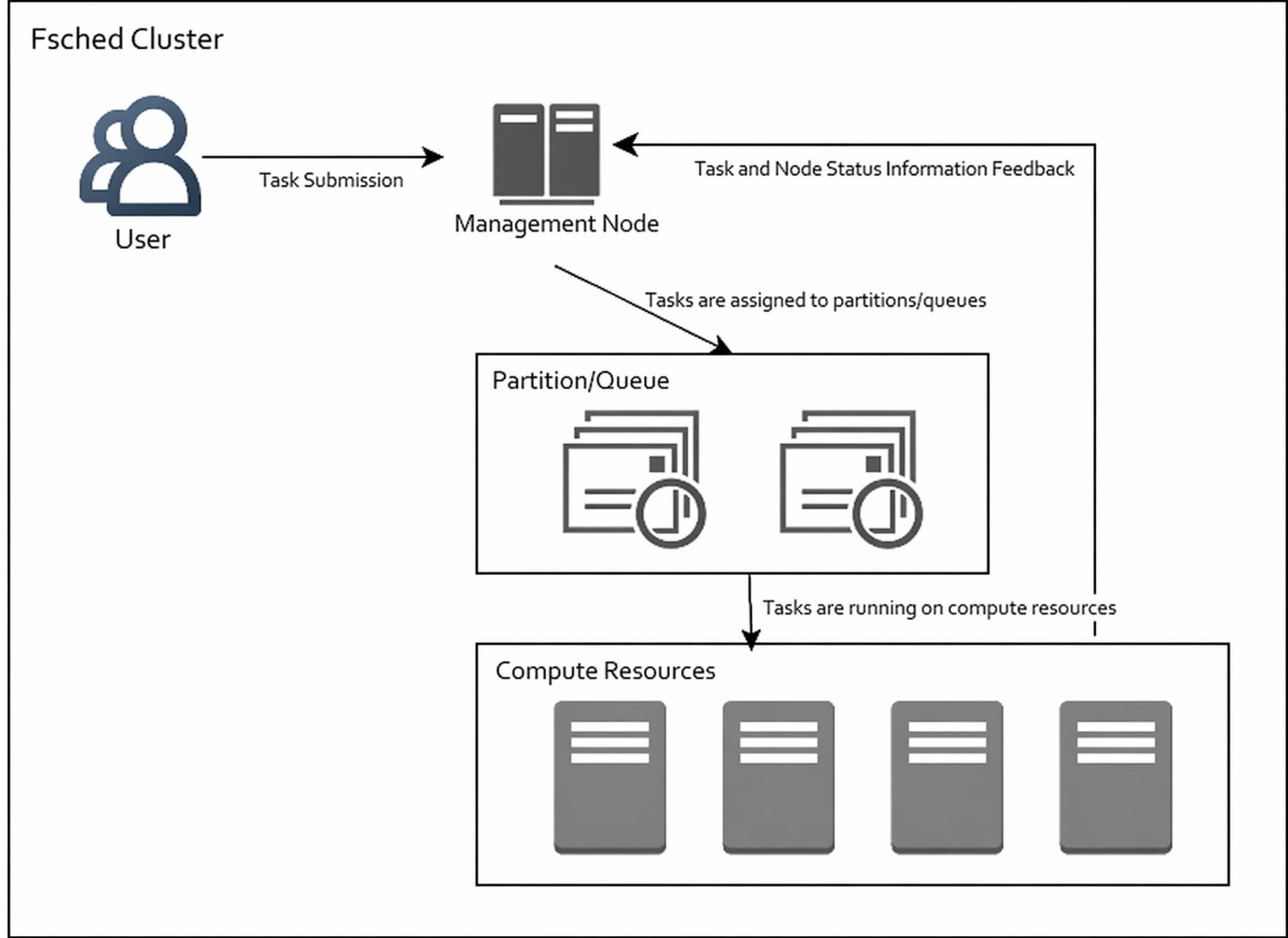
Key Concepts
Cluster
An Fsched cluster is a system composed of multiple nodes. These computers are connected through a network and work together to execute computing jobs. Fsched is used to manage these computing resources and ensure efficient job scheduling and resource allocation. A cluster can range in size from a few computers to thousands of computers.
Node
- Head node: The management node of an Fsched cluster, responsible for accepting user job submissions and managing node states and job states.
- Login node: On some HPC platforms, this is also called a submission node and is used only for submitting computing jobs.
- Compute node: The node on which user-submitted computing jobs actually run.
Partition
A partition is a logical grouping of jobs and nodes, used to divide jobs and nodes in a cluster into different subsets. Each partition can contain different types of nodes, allowing users to choose an appropriate partition for resource requests based on job requirements. Partition settings help manage resource allocation and access permissions, ensuring that different users or jobs can make effective use of cluster resources.
Depending on the administrator's configuration, nodes in different partitions can be either completely independent or overlapping. Jobs submitted to different partitions run at different priorities according to the configured scheduling policies.
In other HPC schedulers, a partition may also be referred to as a "queue" or "Queue".
Job
A job is a computing task submitted by a user to Fsched. It represents a set of resource allocation requests and process execution information. A job can contain multiple job steps and can run in parallel across multiple nodes. Job types include batch jobs and interactive jobs. Users can submit jobs with different commands, such as sbatch and srun, to obtain the required computing resources.