FAQ
Cluster Configuration FAQ
1. Conditions that trigger reconfiguration
When head node HA is not configured for the cluster, reconfiguration is triggered under the following conditions:
- The user has changed the cluster, for example by adding or removing nodes or modifying the configuration.
- The user has manually used the "Reconfigure" feature.
- The management stack cannot obtain information from required services and uses reconfiguration to retrieve critical information again. These services include:
fs-scale: used to obtain cluster job information and maintain the DRAIN state of cluster nodes.fs-statesvc: used to collect job information and analyze job states.
If head node HA is configured for the cluster, automatic reconfiguration is no longer performed.
Scheduler Command FAQ
1. How is priority determined? How can priority be adjusted?
View job priority
squeue # View job information. The larger the PRIORITY value, the higher the priority.
JOBID PARTITION     NAME       USER       ST       TIME  NODES NODELIST    CPUS REASON          PRIORITY TIMELIMIT ACCOUNT
12345   compute    my_job     user1      R        02:15  1     node01      4    None            1000     01:00:00   myaccount
12346   compute    another_job user2     PD       00:10  1     (None)      4    Resources       900      02:00:00   otheraccount
12347   compute    test_job   user1      CG       00:05  1     node02      4    None            950      01:30:00   myaccount

squeue -j <job_id> # Query a specific job ID, including its priority.

squeue -u <username> # Query a specific user, including job priorities.

scontrol show job <job_id> # Query detailed information for a specific job ID, including its priority.
Adjust priority
# Set priority when submitting a job
sbatch --priority=10000 my_script.sh # 1000 is the priority value. The larger the value, the higher the priority.

# An administrator adjusts the priority of an already submitted job
scontrol update jobid=12345 priority=2000 # Change the priority of job ID 12345 to 2000.
Load Threshold FAQ
1. How do stop and resume work?
At the scheduler level, a SIGTSTP signal is sent first and can be trapped. Two seconds later, a SIGSTOP signal is sent and cannot be trapped.
2. Can all jobs be resumed?
Jobs stopped because of the LoadstopMem or LoadstopUt load-threshold parameters can automatically resume and continue running after the load threshold is adjusted.
3. How do I configure load thresholds in FCP?
Load thresholds support custom parameters by partition, and they can be set when creating or editing a partition. The custom parameter configuration entry points are as follows:
- When creating a cluster, set them under Compute Partition Advanced Configuration > Custom Parameters.
- After the cluster is created, set them when creating a compute partition under Advanced Configuration > Custom Parameters.
- After the cluster or compute partition has been created successfully, set them from Partition List > Advanced Configuration > Edit Custom Parameters.
Example configuration:
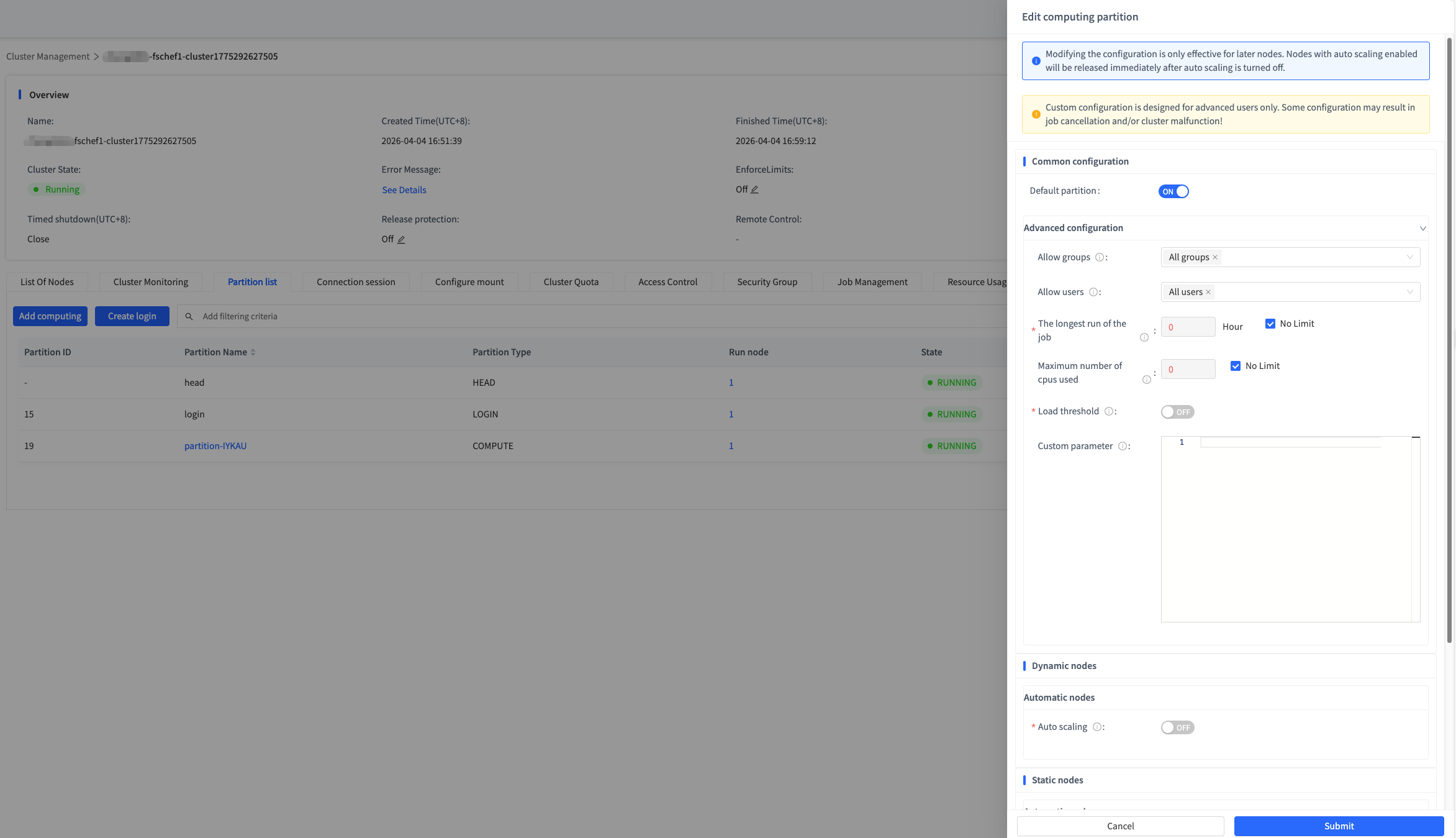
For the supported parameters and detailed descriptions, see the Load Threshold Introduction.
4. Do stopped jobs release compute resources at the scheduler level? What about at the actual system level?
Memory is not released, but CPU resources are released.
5. What is the difference between load-stopped jobs, the scontrol suspend command, and scancel -s SIGSTOP/SIGTSTP?
loadstop: This is a feature that automatically stops jobs under specific load conditions. It is typically used for dynamic job management to prevent cluster overload. Stopped jobs enter theSTstate, memory remains allocated, and CPU resources are released.scontrol suspend: This is a manual command used to suspend a specified job. After it is executed, the job is suspended. Node resources are released, and users can resume the job later withscontrol resume.scancel -s SIGSTOP/SIGTSTP: This command sends signals and can force a specified job to pause by sendingSIGSTOPorSIGTSTPthroughscancel.SIGSTOPcannot be caught, so the job stops immediately.SIGTSTPcan be caught, so the job may choose how to handle it. It cannot stop jobs submitted by thebatchcommand. Stopped jobs enter theSTstate, memory remains allocated, and CPU resources are released.
6. What is the stopping order policy for jobs?
The stopping order policy follows priority, stopping lower-priority jobs first. If a job priority is changed manually, the automatic stopping order used by load thresholds does not change and will still stop jobs according to the old priority.
7. Can load threshold configuration be modified online?
Yes. In the web UI, go to Cluster Management > Partition List > Advanced Configuration > Edit Custom Parameters. See the screenshot in question 3 for reference.
8. Can a similar stop effect to loadstop be achieved manually, where resources are not released?
No.
9. Will manual user actions conflict with the automatic actions in load thresholds?
No.
10. What are the polling intervals for load checks and job/node stop-start actions?
- Load polling interval: Load monitoring, such as automatic job stop/start actions, polls at the configured interval. The default is 30 seconds.
- Node stop/start interval: The interval between node stop/start operations, such as draining a node, is set to 300 seconds. In other words, 300 seconds must pass between two drain operations on the same node.
Other FAQ
1. Child process handling: the difference between cgroup and pgid
cgroup mainly focuses on resource control and monitoring, while pgid focuses on process organization and management. The differences are as follows:
| Feature | cgroup | pgid |
|---|---|---|
| Definition | Control group used for resource limits and monitoring | Process group ID used to identify a set of related processes |
| Function | Resource limiting, usage monitoring, priority management | Signal management, job control |
| Use cases | Container management, multi-user resource control | Terminal job management, process relationship management |
| Scope | Resource management and limits | Process management and job control |