FCP-Suite Approval-Enabled Network Architecture Guide
An FCP-Suite deployment based on an approval architecture is composed of two parts: the approval architecture and the FCP-Suite Fastone stack.
FCP-Suite is the Fastone stack used to build a set of local nodes into a high-performance computing cluster.
The approval architecture adds a data-protection shell around the FCP-Suite Fastone stack. It is an infrastructure deployment architecture.
1. Introduction to FCP-Suite Deployment Based on the Approval Architecture
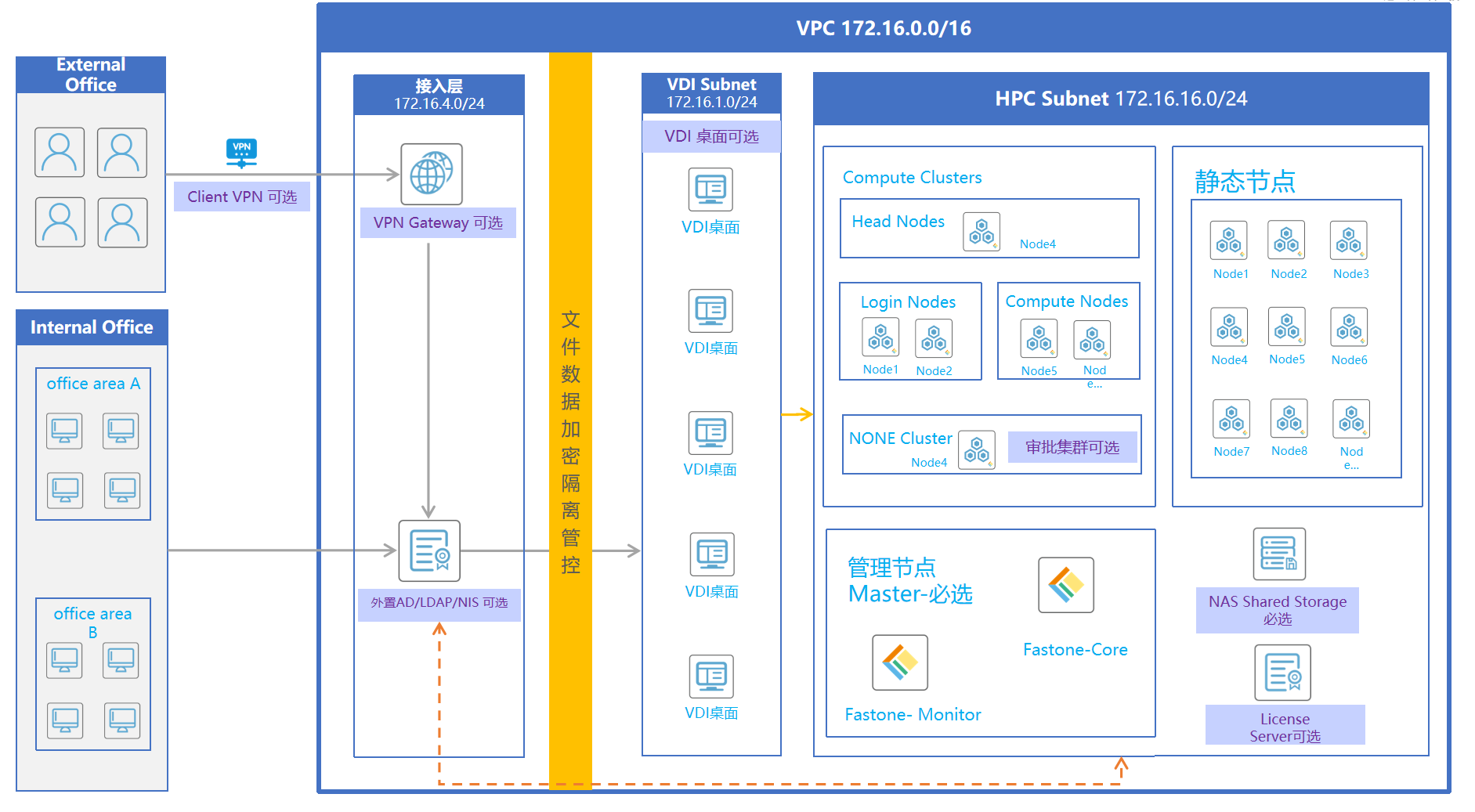
In an approval-based Fastone stack deployment, users log in to the local VPN, use the VPN tunnel to connect to the remote desktop (VDI), and then access the Fastone portal from the remote desktop. Except for downloading approved data by using the DM (Data Manager) tool, the data flow boundary is restricted to the remote desktop.
The approval architecture limits data flow boundaries through network segmentation and firewall rules.
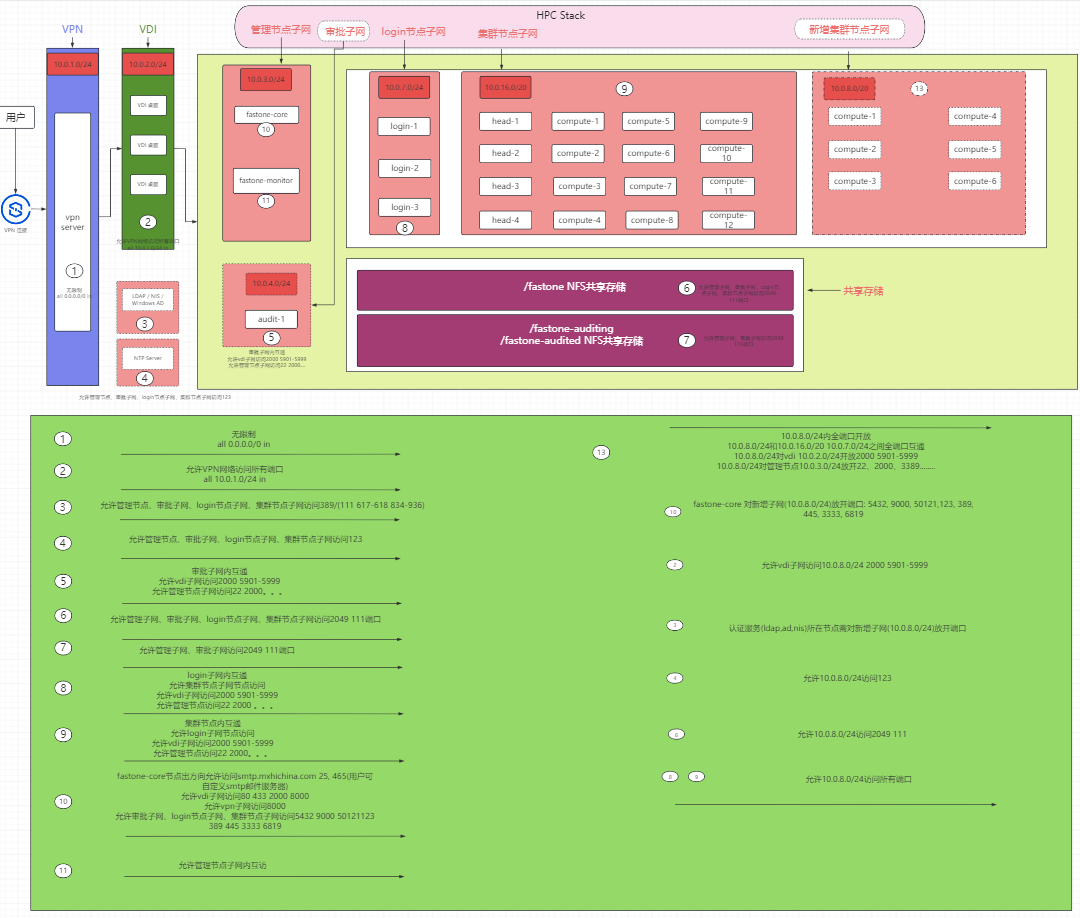
In this design, the approval architecture divides the network into three layers. The first layer is the VPN network layer, the second layer is the VDI network layer, and the third layer is the Fastone stack network. The Fastone stack network also contains other subnets used to build the HPC cluster.
The VPN network layer is mainly planned for VPN deployment. Inbound requests allow only access to the VPN ports from external networks (0.0.0.0/0).
The VDI network layer is mainly planned for VDI deployment. Inbound requests allow only the VPN network layer to access the remote desktop ports.
The Fastone stack network is mainly planned for deploying the Fastone stack and the high-performance cluster. Its planned subnets include the management node subnet, the approval cluster subnet, the high-performance cluster subnet, and the high-performance cluster login-node subnet.
Within the Fastone stack network, hosts used to deploy the Fastone stack system are called management nodes and are planned in the management node subnet. Other hosts in the Fastone stack network are called cluster nodes and are placed into the corresponding subnets based on requirements.
The deployment architecture is shown below:
2. Infrastructure Planning for Approval-Based FCP-Suite Deployments
- Network planning
- Host planning for each network layer
- Firewall planning for each network layer and resource
2.1 Network Planning
Plan three network layers and the corresponding subnets for each layer, and create all networks.
Planned CIDR for the VPN network layer: 10.0.1.0/24
Planned CIDR for the VDI network layer: 10.0.2.0/24
Planned subnets for the Fastone stack network:
- Management node subnet:
10.0.3.0/24 - Approval cluster subnet:
10.0.4.0/24 - High-performance cluster subnet:
10.0.16.0/20 - High-performance cluster login-node subnet:
10.0.7.0/24
2.2 Host Planning for Each Network Layer
2.2.1 Host Planning for the VPN and VDI Network Layers
No recommendation is made for VPN and VDI host resources or operating systems. Plan them as needed.
Note: Place the hosts used for VPN and VDI deployment into the VPN network and VDI network respectively.
2.2.2 Host Planning for FCP-Suite Fastone Stack Deployment
An FCP-Suite Fastone stack deployment requires:
- Resources required to deploy the Fastone stack
- NAS shared storage
- [Optional] Custom authentication services such as LDAP, NIS, or AD
- [Optional] A custom NTP time synchronization server
- Management nodes
- Cluster nodes
2.3 Resources Required to Deploy the Fastone Stack
2.3.1 NAS Shared Storage
No recommendation is made for host resources or operating systems. Plan them as needed.
Provide three shared directories: /fastone, /fastone-auditing, and /fastone-audited.
If the approval cluster subnet (10.0.4.0/24) is planned, ensure that /fastone-auditing and /fastone-audited can be mounted only by nodes in the approval subnet.
This can be restricted by setting the NFS allowcidr.
2.3.2 [Optional] Custom Authentication Services Such as LDAP, NIS, or AD
Provide the selected custom authentication method.
For LDAP, provide: ldap_uri, ldap_base, readonly_binddn, and readonly_bindpw (readonly_binddn and readonly_bindpw are optional)
For NIS, provide: nis_server and nis_domain
2.3.3 [Optional] Custom NTP Time Synchronization Server
Provide the URI of the custom NTP server to use during Fastone stack deployment.
2.3.4 Management Node Planning in the Fastone Stack Network
1. Management node resource requirements
The login users of the two management nodes must have passwordless
sudoprivileges and share the same login password or SSH key.
Management nodes are divided by deployed service type into Fastone-Core and Fastone-Monitor nodes.
For test environments, the following are the minimum requirements. For production environments, use the sizing tool for estimation.
| Node | Operating System | Configuration | Disk |
|---|---|---|---|
| Fastone-Monitor | ubuntu 22.04 | 4 vCPU, 8 GiB RAM | 100 GiB |
| Fastone-Core | ubuntu 22.04 | 4 vCPU, 16 GiB RAM + 8 GiB swap | 100 GiB |
2. Cluster node resource requirements
The login users of all cluster nodes deployed in batch must have passwordless
sudoprivileges and share the same login password or SSH key.
The following are the minimum cluster node requirements. For production environments, use the sizing tool for estimation.
| Node | Operating System | Configuration | Disk |
|---|---|---|---|
| Compute Node | ubuntu 18.04, ubuntu 22.04, centos/redhat 6.10, centos/redhat 7.9 | 2 vCPU, 4 GiB RAM | 50 GiB |
| Head Node | ubuntu 18.04, ubuntu 22.04, centos/redhat 6.10, centos/redhat 7.9 | 4 vCPU, 16 GiB RAM | 50 GiB |
| Login Node | ubuntu 18.04, ubuntu 22.04, centos/redhat 6.10, centos/redhat 7.9 | 2 vCPU, 4 GiB RAM | 50 GiB |
2.4 Firewall Planning for All Network Layers and Resources
2.4.1 Firewall Planning for VPN and VDI Layers
VPN network layer (10.0.1.0/24): inbound requests allow access to the VPN ports only from the external network (0.0.0.0/0).
VDI network layer (10.0.2.0/24): inbound requests allow access to the remote desktop ports only from the VPN network (10.0.1.0/24).
2.4.2 Firewall Planning for the Fastone Stack Network Layer
Unless otherwise specified, the default protocol for all firewall rules below is TCP.
1. NAS shared storage
NFS-related ports such as 2049 (nfs) and 111 (port-mapper) must be accessible from the Fastone stack network, including the management node subnet (10.0.3.0/24), approval cluster subnet (10.0.4.0/24), high-performance cluster subnet (10.0.16.0/20), and high-performance cluster login-node subnet (10.0.7.0/24).
Possible firewall rules:
| Service | Direction | Policy | Protocol | Source | Port Range |
|---|---|---|---|---|---|
| nfs server ip | ingress | allow | tcp | 10.0.3.0/24, 10.0.4.0/24, 10.0.7.0/24, 10.0.16.0/20 | 2049(nfs), 111(port-mapper) |
If the approval cluster subnet (10.0.4.0/24) is planned, ensure that /fastone-auditing and /fastone-audited can be mounted only by nodes in the approval subnet.
This can be restricted by setting the NFS allowcidr.
2. [Optional] Firewall planning for customer-provided authentication services such as LDAP, NIS, or AD
- The node hosting the customer-provided authentication service (
LDAP,NIS,AD) must allow access from the management node network (10.0.3.0/24) to the following ports:ad(389),ldap(389),nis(111,617-618,834-836). - The node hosting the customer-provided authentication service (
LDAP,NIS,AD) must allow access from the cluster node networks (10.0.4.0/24,10.0.16.0/20,10.0.7.0/24) to the following ports:ad(389),ldap(389),nis(111,617-618,834-836).
Possible firewall rules:
| Service | Direction | Policy | Protocol | Source | Port Range |
|---|---|---|---|---|---|
| External authentication service | ingress | allow | tcp | 10.0.3.0/24, 10.0.4.0/24, 10.0.7.0/24, 10.0.16.0/20 | ad(389),ldap(389),nis(111,617-618,834-836) |
3. [Optional] Firewall planning for a customer-provided NTP server
- The node hosting the customer-provided NTP server must allow access from the management node network (
10.0.3.0/24) to port123overudp. - The node hosting the customer-provided NTP server must allow access from the cluster node networks (
10.0.4.0/24,10.0.16.0/20,10.0.7.0/24) to port123overudp.
Possible firewall rules:
| Service | Direction | Policy | Protocol | Source | Port Range |
|---|---|---|---|---|---|
| ntp | ingress | allow | udp | 10.0.3.0/24, 10.0.4.0/24, 10.0.7.0/24, 10.0.16.0/20 | 123 |
4. Firewall planning for the outbound mail server
The firewall on the fastone-core node must allow outbound mail-related connections (25, 465) to the external mail server (smtp.mxhichina.com).
Possible firewall rules:
| Target | Direction | Policy | Protocol | Source | Port Range |
|---|---|---|---|---|---|
| fastone-core | egress | allow | tcp | smtp.mxhichina.com | 25, 465 |
5. Firewall planning for management nodes
- All ports must be reachable between management nodes.
- The
fastone-corenode must open the following ports to the VDI network (10.0.2.0/24):80,433,2000 (ra),8000 (dm). - The
fastone-corenode must open port8000to the VPN network (10.0.1.0/24). - The
fastone-corenode must open the following ports to the cluster node networks (10.0.4.0/24,10.0.16.0/20,10.0.7.0/24):5432 (pg),9000 (api),50121 (loki),123 (ntp, udp protocol),389 (ldap),445 (samba, optional),3333 (slurm-accounting-agent),6819 (slurmdbd).
Possible firewall rules:
| Target | Direction | Policy | Protocol | Source | Port Range |
|---|---|---|---|---|---|
| 10.0.3.0/24 | all | allow | all | 10.0.3.0/24 | all |
| fastone-core | ingress | allow | tcp | 10.0.2.0/24 | 80, 433, 2000(ra), 8000(dm) |
| fastone-core | ingress | allow | tcp | 10.0.1.0/24 | 8000 |
| fastone-core | ingress | allow | tcp | 10.0.4.0/24, 10.0.16.0/20, 10.0.7.0/24 | 5432(pg), 9000(api), 50121(loki), 123(ntp, udp), 389(ldap), 445(samba, optional), 3333(slurm-accounting-agent), 6819(slurmdbd) |
6. Firewall planning for cluster nodes
- All ports must be mutually reachable inside the cluster node networks (
10.0.4.0/24,10.0.16.0/20,10.0.7.0/24). - Except for the approval cluster, all ports must be mutually reachable between the cluster node networks (
10.0.16.0/20,10.0.7.0/24). - Nodes in the cluster node networks (
10.0.4.0/24,10.0.16.0/20,10.0.7.0/24) must open the following ports to the VDI network (10.0.2.0/24):2000 (ra),5901-5999 (vnc port). - Nodes in the cluster node networks (
10.0.4.0/24,10.0.16.0/20,10.0.7.0/24) must open the following ports to the management node network (10.0.3.0/24):
| Service | ssh | remote-access svc | rdp | rpc-statd | vnc | slurmctld | scheduler | loki | fs-scale | billing-mgr |
|---|---|---|---|---|---|---|---|---|---|---|
| Port | 22 | 2000 | 3389 | 4003-4004 | 5900-5999 | 6817 | 7000 | 25057-25058 | 50023 | 5000-5001 |
| Service | sge-master/sge-exec | slurmExporterPort | pbsproExporterPort | sge-exporter | lsfExporterPort | nodeExporterPort | wmiExporterPort | dcgmExporterPort |
|---|---|---|---|---|---|---|---|---|
| Port | 6444-6445 | 8010 | 8020 | 8040 | 8060 | 9100 | 9182 | 9400 |
Possible firewall rules:
| Target | Direction | Policy | Protocol | Source | Port Range |
|---|---|---|---|---|---|
| 10.0.4.0/24 | all | allow | all | 10.0.4.0/24 | all |
| 10.0.16.0/20 | all | allow | all | 10.0.16.0/20, 10.0.7.0/24 | all |
| 10.0.7.0/24 | all | allow | all | 10.0.16.0/20, 10.0.7.0/24 | all |
| 10.0.4.0/24, 10.0.16.0/20, 10.0.7.0/24 | ingress | allow | tcp | 10.0.2.0/24 | 2000(ra), 5901-5999(vnc port) |
| 10.0.4.0/24, 10.0.16.0/20, 10.0.7.0/24 | ingress | allow | tcp | 10.0.3.0/24 | 22,3389,4003-4004,5901-5999,6817,7000,25057-25058,50023,5000-5001,8010,8020,8060,9100,9182,9400,8040,6444,6445 |
7. Firewall planning for newly added cluster subnets
Assume the new subnet is 10.0.8.0/24.
fastone-coremust open the following ports to the new subnet (10.0.8.0/24):5432 (pg),9000 (api),50121 (loki),123 (ntp, udp protocol),389 (ldap),445 (samba, optional),3333 (slurm-accounting-agent),6819 (slurmdbd).- [Optional] If a customer-provided external authentication system is used:
- The node hosting the customer-provided authentication service (
LDAP,NIS,AD) must allow access from the new subnet (10.0.8.0/24) toad(389),ldap(389),nis(111,617-618,834-836).
- The node hosting the customer-provided authentication service (
- [Optional] If a customer-provided external NFS server is used:
- The node hosting the customer-provided NTP server must allow access from the new subnet (
10.0.8.0/24) to port123overudp.
- The node hosting the customer-provided NTP server must allow access from the new subnet (
- All ports must be mutually reachable within the new subnet (
10.0.8.0/24). - All ports must be mutually reachable between the new subnet (
10.0.8.0/24) and the cluster node networks (10.0.16.0/20,10.0.7.0/24). - Nodes in the new subnet (
10.0.8.0/24) must open the following ports to the VDI network (10.0.2.0/24):2000 (ra),5901-5999 (vnc port). - Nodes in the new subnet (
10.0.8.0/24) must open the following ports to the management node network (10.0.3.0/24):
| Service | ssh | remote-access svc | rdp | rpc-statd | vnc | slurmctld | scheduler | loki | fs-scale | billing-mgr |
|---|---|---|---|---|---|---|---|---|---|---|
| Port | 22 | 2000 | 3389 | 4003-4004 | 5900-5999 | 6817 | 7000 | 25057-25058 | 50023 | 5000-5001 |
| Service | sge-master/sge-exec | slurmExporterPort | pbsproExporterPort | sge-exporter | lsfExporterPort | nodeExporterPort | wmiExporterPort | dcgmExporterPort |
|---|---|---|---|---|---|---|---|---|
| Port | 6444-6445 | 8010 | 8020 | 8040 | 8060 | 9100 | 9182 | 9400 |
Possible firewall rules:
| Target | Direction | Policy | Protocol | Source | Port Range |
|---|---|---|---|---|---|
| fastone-core | ingress | allow | tcp | 10.0.8.0/24 | 5432(pg), 9000(api), 50121(loki), 123(ntp, udp), 389(ldap), 445(samba, optional), 3333(slurm-accounting-agent), 6819(slurmdbd) |
| [Optional] Node hosting the customer-provided authentication service (LDAP,NIS,AD) | ingress | allow | tcp | 10.0.8.0/24 | ad(389),ldap(389),nis(111,617-618,834-836) |
| [Optional] If a customer-provided external nfs-server is used | ingress | allow | udp | 10.0.2.0/24 | 123 |
| 10.0.8.0/24 | all | allow | all | 10.0.8.0/24 | all |
| 10.0.8.0/24 | all | allow | all | 10.0.16.0/20,10.0.7.0/24 | all |
| 10.0.8.0/24 | ingress | allow | tcp | 10.0.2.0/24 | 2000(ra), 5901-5999(vnc port) |
| 10.0.8.0/24 | ingress | allow | tcp | 10.0.3.0/24 | 22,3389,4003-4004,5901-5999,6817,7000,25057-25058,50023,5000-5001,8010,8020,8060,9100,9182,9400,8040,6444,6445 |