Head Node High Availability
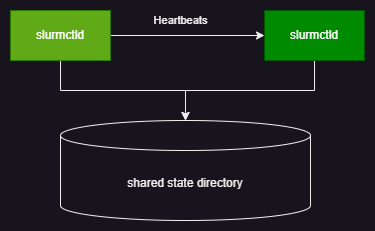
Fsched supports high availability for head nodes in an active/standby setup. By configuring head node HA, you can ensure head node availability. When a head node fails, Fsched automatically switches to a standby head node to maintain service continuity. Multiple head nodes share state information through a shared file system to keep state consistent.
Terms
Head node: the node that hosts the fsched controller. Primary node: the head node that handles jobs under normal conditions. Standby node: the head node that provides hot standby.
Prerequisites
Head node HA uses a file system to transfer state information, so a shared file system is required. This is typically provided by a reliable NFS system. To ensure HA reliability, the NFS system must be reliable, and it should provide at least the following performance (because this shared storage is used by all clusters, the values below are per cluster):
- Read performance: > 10 reads/s and 300 KB/s
- Write performance: > 100 writes/s and 10000 KB/s
- Capacity: > 10 GB
This shared file system must be specified in the platform configuration using the following setting:
Configure Head Node HA
After the shared state directory is configured, head node HA is automatically enabled when the cluster has more than one head node.
How Head Node HA Works
- Fsched sorts head nodes by hostname. The first is the primary node; the others are standby nodes.
- The primary node periodically (~15s) sends heartbeat signals to standby nodes and uses the shared directory to notify them of head node status.
- When the primary node fails, the heartbeat exceeds the configured timeout (~30s). A standby node begins taking over the primary node's work.
- Other client components in Fsched check head node status and switch to a standby node by polling according to the configuration.
Handling Head Node HA Failures
Cluster Status After Head Node Failure
Because of the head node's special role, the platform does not make assumptions about head nodes, especially in the local system where the node state cannot be known with certainty. The platform does not automatically evict head nodes. Therefore, after any head node failure, the platform cannot push configuration to the cluster normally.
Head Node Recovery
After a head node failure, a standby node takes over head node operations. If the failure has been resolved, restore the head node using the steps below.
Node Recovery
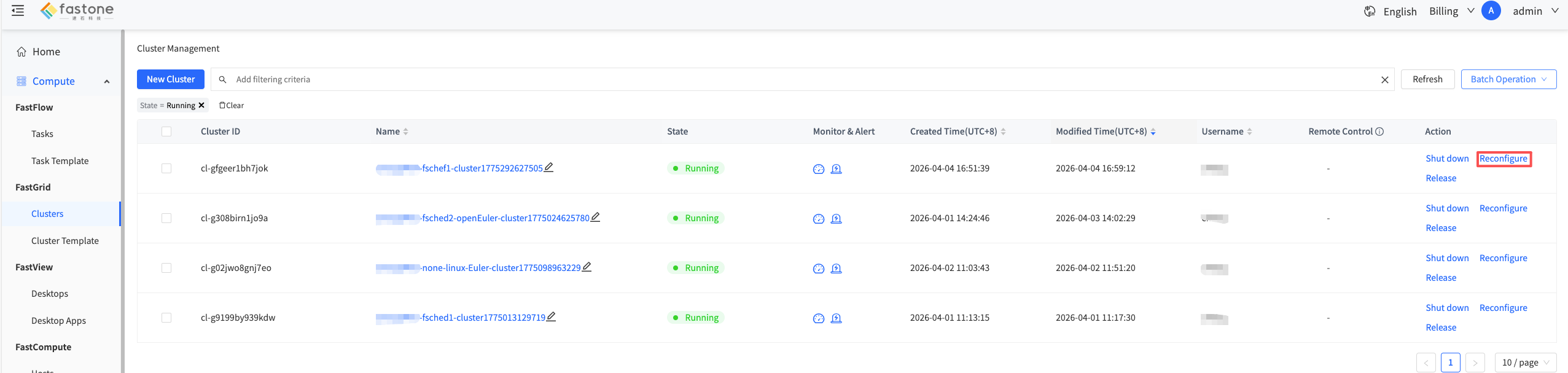
After the head node issue is resolved, click "Reconfigure" in the UI to push configuration and restore the cluster.
Head Node Replacement
If the head node issue cannot be resolved, replace the head node by following these steps:
- Delete the failed head node in the UI.
- Add a new head node.
Temporary Handling During Head Node Failure
When the primary node fails, all cluster commands and cluster nodes try each controller in configuration order, and each node has a timeout. If it is clear that the primary node needs time to recover and business latency needs to be optimized, you can temporarily remove the failed node. The platform will reconfigure the cluster and select a new node as the primary node.
If you need to make cluster changes at this time, you should first restore the head node.
Head Node Primary/Standby Relationship
All slurm components try head nodes in configuration order. At any time, only one head node is the primary node, and the other head nodes are standby nodes. The primary/standby relationship is assigned as follows:
- Head nodes are assigned by hostname order. The first head node is the primary node, and the others are standby nodes. For example,
head-1is the primary node andhead-2is the standby node, and so on.
FAQ
-
During job submission, the message "Job jobid is missing from controller" appears and the submission fails.
To ensure controller responsiveness and scheduling performance, all job state information is stored on the shared disk via asynchronous IO. We try to start scheduling and writing the job immediately after submission. However, writes may still be incomplete due to cache and other reasons. If the controller fails before job state is written, the backup controller loses information about the submitted job and reports that the job state does not exist. The user must resubmit the job.
-
After the primary node fails,
scontrol pingshows that the head node has not switched.The Fsched primary/standby label does not change with failover. When the primary node fails, the "primary" and "standby" roles do not change. After the standby node takes over cluster operations, it becomes a fully functional controller, but its role in the cluster is still "standby." If you want to reassign the primary/standby relationship, refer to Temporary Handling During Head Node Failure and adjust accordingly.
-
Job runtime is longer than expected when a node is abnormal.
Fsched records job runtime via the head node. If the head node is abnormal, the end of jobs cannot be recognized or recorded during the failover. This causes the job end time to be longer than expected.
-
When a head node is abnormal, platform reconfiguration does not complete and stays in "configuring."
Because of the head node's special role, the platform does not automatically evict head nodes. When any head node is abnormal, to avoid configuration differences across head nodes, the platform does not push configuration to the cluster. The cluster status remains "configuring" until the user intervenes, removes the failed node, and the platform reselects a primary node and pushes configuration.